













- AI Hub
- Sellbird
Open-source project · Sales & lead generation
Sellbird – AI-assisted B2B prospecting: research, qualify, verify
Sellbird (formerly Harvey) is an open-source pipeline that finds suitable companies, detects buying signals on their websites, identifies decision-makers and checks email addresses – locally on your own computer, using your existing Claude or ChatGPT plan.
- AGPL-3.0 licence
- Version 0.4.0 (6 Nov 2026)
- Python 3.11+
- Checked: 24 Nov 2026
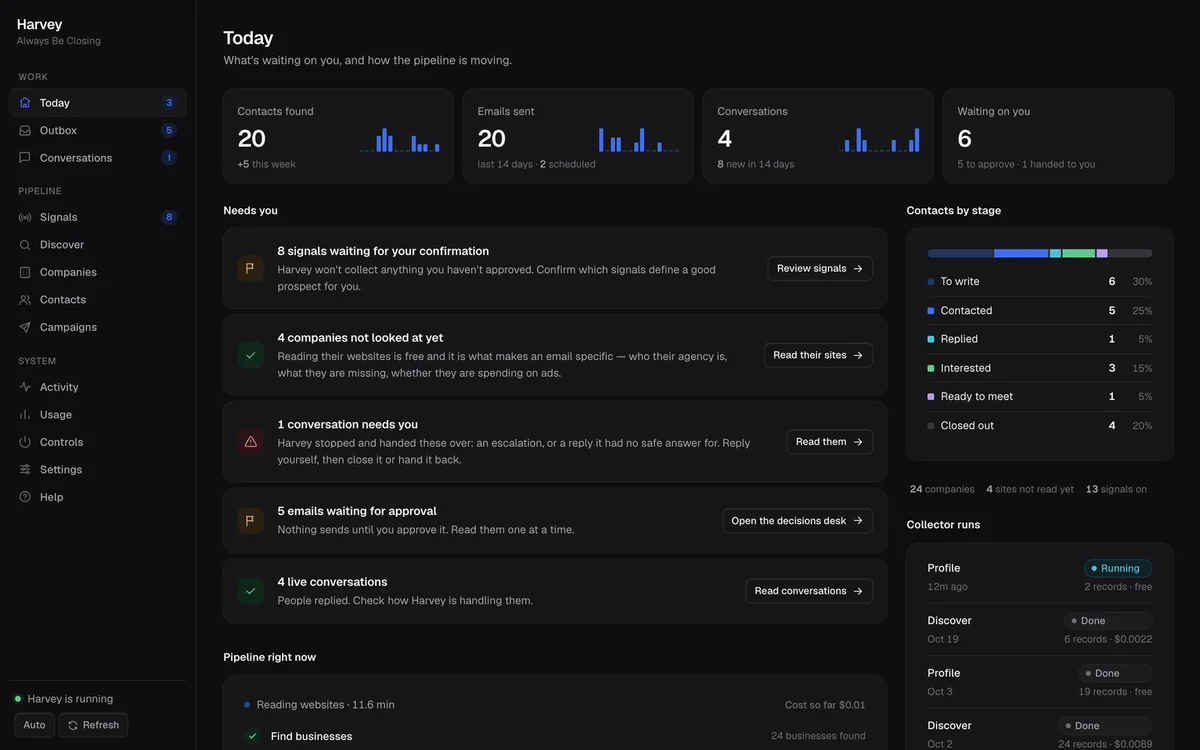
Official screenshot from the Sellbird repository. According to the project, the demo data shown is invented.
Important for companies in Germany
Sellbird is designed for automated cold email. In Germany, advertising emails without prior consent are generally not permitted, even between businesses. We therefore present Sellbird primarily as a tool for research, qualification and workflow support. Please read the compliance section before using it.
What Sellbird does
Sellbird works as a pipeline you can run end to end or stop at any step. It reads company websites with simple HTTP requests and uses the Claude Code CLI on a Claude Pro or Max plan – or Codex on a ChatGPT plan – for the steps that need a language model. According to the project, no separate model API key is required.
If you only need the research results, stop after verification and export everything as CSV with sellbird export.
Who it is useful for
- Sales teams that build and qualify target account lists
- Agencies and consultancies preparing account research
- Companies that want to check data quality before importing into a CRM
- Technically confident teams that can run a Python tool themselves
Features: the pipeline step by step
As described in the official README for version 0.4.0.
Prospect research
Searches for businesses that match your customer profile – free via OpenStreetMap or via a paid source of your choice, with the cost shown before each paid search.
Lead qualification
Reads each company’s own website for the buying signals you confirmed, such as missing online booking or open positions – without any model calls.
Decision-maker research
Finds the owner or manager named on the company’s own pages, with at most two people per company.
Contact-data verification
Learns the company’s email pattern and checks an address. Every address is marked verified, risky, guess or invalid.
Personalisation workflows
Drafts a short, personal email sequence for each person based on what it found, and drafts answers to replies.
Approval before sending
By default, every outgoing email waits in the Outbox for your approval. Opt-outs are honoured immediately and permanently.
Recommended workflow for German companies
We recommend using Sellbird as a research and qualification assistant and keeping any outreach in a separately checked, compliant process.
Train on your offer
Sellbird learns your product from your website and suggests buying signals for you to confirm.
Research and qualify
Find companies, check their signals and identify the responsible decision-maker.
Verify and export
Verify the contact data, then export the results as CSV for review in your CRM.
Contact compliantly
Get in touch only through channels whose admissibility has been checked for the individual case.
Installation and configuration
Commands as documented in the official README (checked 24 Nov 2026).
Prerequisites
Python 3.11 or newer, plus Claude Pro or Max with the Claude Code CLI signed in, or a ChatGPT plan with the Codex CLI. A mailbox is only needed if you want to send emails. On Linux, Sellbird can also run with Docker.
Option 1: let Claude set it up
git clone https://github.com/ethanplusai/sellbird.git
cd sellbird
claude
Then say “set up Sellbird for me”. The repository’s CLAUDE.md turns Claude Code into the setup guide.
Option 2: manual setup for research
python3.13 -m venv .venv && source .venv/bin/activate && pip install -e .
cp .env.example .env
sellbird train https://your-company.com
sellbird signals --confirm free
sellbird discover
sellbird export
Use python3.13 instead of python3 on macOS, as the preinstalled version there is 3.9.
Dashboard
sellbird dashboardPrints a private link to the local dashboard at 127.0.0.1:5555. The outreach loop is started separately with sellbird run; drafts wait in the Outbox for approval by default.
Common setup problems
- Wrong Python version:
python3 --versionshows 3.9 on macOS – install Python 3.13, for example with Homebrew. - Claude is not signed in: run
claude loginbefore starting Sellbird. - Upgrading from Harvey: configuration and data carry over; follow the upgrade section in the README.
Legal framework in Germany: UWG and GDPR
Status: November 2026. This section provides general information and is not legal advice.
Unsolicited advertising emails (§ 7 UWG)
Under § 7 (2) UWG, advertising by email without the recipient’s prior express consent is generally considered an unreasonable nuisance – towards businesses as well. The exception in § 7 (3) UWG for existing customers is narrowly defined. Sellbird’s own documentation also notes that Germany requires prior consent even for business email.
Data protection (GDPR)
Collecting and storing personal contact data – even from public websites – requires a legal basis, typically legitimate interest under Art. 6 (1)(f) GDPR. It also triggers information duties under Art. 14 GDPR, the right to object under Art. 21 GDPR, and principles such as data minimisation and deletion periods.
Settings in Sellbird that help
Approval in the Outbox before anything is sent, a do-not-contact list, an opt-out line in every email, and an optional per-recipient check via the external service Precleared.
Our recommendation
Use Sellbird for research and qualification, keep autopilot switched off, document the source and legal basis of every contact, and have your outreach process checked by a lawyer before the first campaign.
LinkedIn automation is switched off by default. According to the project documentation, browser automation violates LinkedIn’s terms of use and can lead to account restrictions.
Practical business examples
Build a target account list
Compile companies in a region and industry that match your ideal customer profile.
Prepare trade-fair meetings
Research exhibitors or visitors in advance and prepare relevant talking points.
Sharpen your offer
Use detected signals, such as missing online booking, to see which problems are common in your market.
Clean data before a CRM import
Check email addresses and mark risky or invalid ones before importing them.
Answer existing conversations
Let Sellbird draft replies to incoming answers – you approve each one.
Account research for agencies
Prepare structured background on potential clients before a first meeting.
QDS assessment · editorial review, no performance test
Our assessment: advantages and limitations
Based on the repository documentation for version 0.4.0. We have not run our own tests of hit rates or deliverability.
Advantages
- Runs locally; your data stays in your own environment
- Approval before sending is the default
- Costs of paid data sources are shown before each search
- Every step can be stopped – including a pure CSV export
Limitations
- Built around cold-email practice, which is generally not permitted in Germany without consent
- AGPL-3.0: obligations apply if you offer a modified version to others over a network
- Data source coverage for your target region should be tested first
- Requires technical setup and ongoing maintenance
Frequently asked questions
Is Sellbird free?
The software is open source under the AGPL-3.0 licence. You need a Claude Pro or Max plan or a ChatGPT plan with Codex; paid data sources and a mailbox can cause additional costs. A hosted version, sellbird.ai, is in early access according to the project.
May I send cold emails with Sellbird in Germany?
Advertising emails without prior consent are generally not permitted in Germany, including in B2B. Please have your specific process checked by a lawyer. We recommend using Sellbird for research and qualification.
Does Sellbird send emails automatically?
Not by default. Every outgoing email waits in the Outbox for your approval until you switch on autopilot yourself.
Where is my data stored?
Configuration and data are stored in a local folder on your computer, including the database, logs and dashboard token. Model steps run through the Claude or Codex CLI you are signed in to.
Can I use the results in my CRM?
Yes. sellbird export creates a CSV file of everything found, which you can review and import into your CRM – provided the processing is covered by a legal basis.